Tuesday, July 31, 2012
Trick To Hide Data Folder In Cellphone Without Any Software
Hello friends, here is a nice trick for you to hide your data folder without using any software.
Here you have to follow some steps to do so:
Create any new folder or you can use any existing folder that is to be hidden.
Rename the folder to any name but with the extension of .jad like if I want to hide my images folder then I will name it as IMG.jad
Now create a new folder with the same name in the same directory but with the extension of .jar So, I would create the folder with the name IMG.jar
Now your orignal images folder which has been renamed with.jad gets hidden and only folder with.jar extension is visible which is empty.
So,data is protected/hidden from unwanted peoples.
To unhide the orignal folder you have to remove the .jar extension from the new folder and your orignal folder with all the files andwith .jad will become visible.
That's it.


Monday, April 16, 2012
Use USB as Ram

1. Sab Se Pehle Aap Ne 1 Usb Laini He Jo 2gb Ya Is Se Choti Ho. Usb Puri Khali Honi Chaiye.
2. Usb Ko Computer Main Lagain Or Is Ka Name Change Kar Ke "Ram Drive" Rakh Rakh Dain.
3. Ab My Computer Ki Properties Me Jayein Or Advance Me Click Karain. Phir Perofomance Ki Setting Mein Jayien. Phir Advance Me Jayein Or Virtual Memory Mein Change Pe Click Karain.
4. Ab Ram Drive Pe Click Karain Phir Costum Or Maximum Size Pe Click Krein. Valve Availibale Size Se 5 MB Kam Kar Kr Ke Likh Dein.
5. Ab Apply Pe Or Phir Ok Pe Click Karain.
6. Yahan Coumputer Restart Ka Option Ayga. Ok Kr Dein.Computer Restart Ho Jaye ga. Ab Apki Usb Ram K Tor Pe Kam Kar Rahi Hai.
7. Yad Rakhein,Usb Unused UsE Karain. Kiun K Is K Bad Usb Nahi Nikalni. Warna Computer Crash Ho Jyga.
Try IT And See The Difference...End
Command Prompt on Right-Click
Many computer users, specially the programmers, need to launch a command prompt window every once in a while to execute some dos/shell commands. The problem is, when a command prompt window launched, the default path is normally the system path or the user profile's path. The users will then have to do all the "cd" commands to change the directories to the path he/she wants.
This trick shows you how to add an option called "Command Prompt" when you right-click on a folder in Windows. With this option, a Command Prompt Window will launch and its current directory will be the path to the folder you've selected.
This trick shows you how to add an option called "Command Prompt" when you right-click on a folder in Windows. With this option, a Command Prompt Window will launch and its current directory will be the path to the folder you've selected.
Here's what you'll get:


Method:
Just Follow The Following Steps:
1. Start > Run
2. Enter "regedit" and hit Enter
3. Expand to "HKEY_LOCAL_MACHINE\SOFTWARE\Classes\Folder\shell"
4. Right-click on "shell" and select New > Key
5. Make sure a new key is created under "shell". Change the name of this key to "Command Prompt"
6. Right-click on this new key "Command Prompt" and select New > Key
7. Change the name of this key to "command"
Here's what we should have:

8. Double-click on the "(Default)" text on the right window to bring up the edit box
9. Enter this text into the Value Data field:
cmd.exe "%1"
10. Click OK and close the registry......Done
Basic Shortcut Keys
The followings are some basic PC shortcut keys that are supported in most IBM compatible computers. They are also supported in most application software.
Use at your own risk.
| Shortcut Keys | Supported Window Versions | Description |
| Alt + e | 95, 98, ME, NT, 2000, XP, Vista | Pull down the top Edit menu. |
| Alt + f | 95, 98, ME, NT, 2000, XP, Vista | Pull down the top File menu |
| Ctrl + a | 95, 98, ME, NT, 2000, XP, Vista | Select all text. |
| Ctrl + c | 95, 98, ME, NT, 2000, XP, Vista | Copy selected item(s) (to clipboard). |
| Ctrl + f | 95, 98, ME, NT, 2000, XP, Vista | Find. |
| Ctrl + v | 95, 98, ME, NT, 2000, XP, Vista | Paste copied item(s) from clipboard |
| Ctrl + x | 95, 98, ME, NT, 2000, XP, Vista | Cut. |
| Ctrl + Ins | 95, 98, ME, NT, 2000, XP, Vista | Same as Ctrl + c |
| Ctrl + (left arrow) | 95, 98, ME, NT, 2000, XP, Vista | Move one word to the left at a time. |
| Ctrl + (right arrow) | 95, 98, ME, NT, 2000, XP, Vista | Move one word to the right at a time. |
| Shift + Ins | 95, 98, ME, NT, 2000, XP, Vista | Same as Ctrl + v |
| Shift + Delelte (or Del) | 95, 98, ME, NT, 2000, XP, Vista | Cut. Or permanently delete selected item(s) on Windows Explorer. |
| F1 | 95, 98, ME, NT, 2000, XP, Vista | Help. |
| Home | 95, 98, ME, NT, 2000, XP, Vista | Jump to the beginning of the line or page. |
| Ctrl + Home | 95, 98, ME, NT, 2000, XP, Vista | Jump to the beginning of the document or page. |
| End | 95, 98, ME, NT, 2000, XP, Vista | Jump to the end of the line or page. |
| Ctrl + End | 95, 98, ME, NT, 2000, XP, Vista | ump to the end of the document or page. |
| Shift + Home | 95, 98, ME, NT, 2000, XP, Vista | Set selection (highlight) from current position to beginning of the line or page. |
| Shift + End | 95, 98, ME, NT, 2000, XP, Vista | Set selection (highlight) from current position to end of the line or page. |
| Shift + (left arrow) | 95, 98, ME, NT, 2000, XP, Vista | Set selection (highlight) from current position to the left, one character at a time. |
| Shift + (right arrow) | 95, 98, ME, NT, 2000, XP, Vista | Set selection (highlight) from current position to the right, one character at a time. |
| Shift + (down arrow) | 95, 98, ME, NT, 2000, XP, Vista | Set selection (highlight) from current position to the next line down. |
| Shift + (up arrow) | 95, 98, ME, NT, 2000, XP, Vista | Set selection (highlight) from current position to the next line up. |
Any Folder as a Photo Folder
This trick shows you how to setup any folder to display its contents as a photo folder. In many cases, you save your images/photos in a folder different than "My Pictures" (under "My Documents"). Since this folder you choose is just like any other normal folders, its contents displayed as a listing of files. You can temporary change it by just right-click and select "View" >> "Thumbnails". But if you want to change the folder so that everytime you come back, the folder itself, as well as all its subfolders, display the contents as photo thumbnails. Just Follow The Following Steps:
1. Right-click on the folder you choose and select "Properties"

2. Select "Customize" Tab. Then under "Use this folder type as a template", select "Pictures (best for many files)"

3. Check on "Also apply this template to all subfolders" to apply the setting to subfoders as well

3. Check on "Also apply this template to all subfolders" to apply the setting to subfoders as well
4. Apply & Click OK to exit......Done
Sunday, April 15, 2012
Notepad Fun Tricks
~!~!~!~ Trick#1 ~!~!~!~
1. Open a blank Notepad file
2. Write .LOG as the first line of
the file, followed by a enter.
Save the file and close it. 3. Double-click the file to open
it and notice that Notepad
appends the current date and
time to the end of the file and
places the cursor on the line
after. 4. Type your notes and then
save and close the file. After that open the file and see
the changes.
by this trick u can also use ur
notebook as a personal diary. ~!~!~!~ Trick#2 ~!~!~!~ 1.open notepad
2. type "bush hid the facts"
3. save it and close it...
4 then open it again........n see
the changes............... ~!~!~!~ Trick#3 ~!~!~!~
Do you know the number of
the flight that was used to
attack the world Trade
Centre????
The flight number was Q33N. Now, open your Notepad, type
the number of the flight (i.e.
Q33N).
Now click on format>font,
increase the font size upto 72,
and change the font style to 'wingdings'. Now see the
ammmaaazzzing thing. ~!~!~!~ Trick#4 ~!~!~!~
Over at WinCustomize,
someone thought they'd
found an Easter Egg in the
Windows Notepad application.
If you: 1. Open Notepad
2. Type the text "this app can
break" (without quotes)
3. Save the file
4. Re-open the file in Notepad Notepad displays seemingly-
random Chinese characters, or
boxes if your default Notepad
font doesn't support those
characters. It's not an Easter egg (even
though it seems like a funny
one), and as it turns out,
Notepad writes the file
correctly. It's only when
Notepad reads the file back in that it seems to lose its mind.
1. Open a blank Notepad file
2. Write .LOG as the first line of
the file, followed by a enter.
Save the file and close it. 3. Double-click the file to open
it and notice that Notepad
appends the current date and
time to the end of the file and
places the cursor on the line
after. 4. Type your notes and then
save and close the file. After that open the file and see
the changes.
by this trick u can also use ur
notebook as a personal diary. ~!~!~!~ Trick#2 ~!~!~!~ 1.open notepad
2. type "bush hid the facts"
3. save it and close it...
4 then open it again........n see
the changes............... ~!~!~!~ Trick#3 ~!~!~!~
Do you know the number of
the flight that was used to
attack the world Trade
Centre????
The flight number was Q33N. Now, open your Notepad, type
the number of the flight (i.e.
Q33N).
Now click on format>font,
increase the font size upto 72,
and change the font style to 'wingdings'. Now see the
ammmaaazzzing thing. ~!~!~!~ Trick#4 ~!~!~!~
Over at WinCustomize,
someone thought they'd
found an Easter Egg in the
Windows Notepad application.
If you: 1. Open Notepad
2. Type the text "this app can
break" (without quotes)
3. Save the file
4. Re-open the file in Notepad Notepad displays seemingly-
random Chinese characters, or
boxes if your default Notepad
font doesn't support those
characters. It's not an Easter egg (even
though it seems like a funny
one), and as it turns out,
Notepad writes the file
correctly. It's only when
Notepad reads the file back in that it seems to lose its mind.
Use Multiple Twitter IDs Through 1 Sim!
 Apne Mobile se Twitter pe 1 se zyada Ids use krein. Follow These 6 Steps:
1. Sub se phle stop likh k 2 bar 40404 pe send krein. Pehli bar stop krne se ap k Followers zero ho jayein ge.
2. Phir net sy twitter.com Visit kr k jitne mrzi ID's bnayein.
3. Ab Mobile se Start likh kr send krein.
4. Ab Id or Phir Password likh k send krein. Password wo likhein jo aap ny net py us ID ko diya tha. Is trah Aap login ho jayein ge.
5. Ab koi or ID use krni ho to STOP likh kr send krein. Is bar ap k Followers zero nhi hon ge.
6. Ab phir START likh likh kr send krein. Phir ID name or phr password likh kr send krein.
ENJOY!
Friday, April 13, 2012
Mobilink Trick
 Mobilink k MobiTune k No. 230 pr Call Charges Rs. 5.98/min hain. Ap Rs. 0.60/min main b Enjoy kr sktay hain. Dial 2300000

Tuesday, March 27, 2012
Earn Money Through Twitter
Friends, ye Internet se Earning ka Boht hi Easy Method he. Is se Aap ko Sirf Shuru Mein 1 din kam krna pare ga, Phir Aap ko sari Zindgi Free Earning hoti Rahe gi:
1. Http://adf.ly/5ynxo Open krein, 5 Seconds tk wait krein & "Skip Add" pe Click krein. Phir jo Website Open ho, Us pe Signup krein.
2. Twitterfeed.com Open krein & yahan b Signup krein.
3. Ab koi Topic (Jaise Islam, Books, News, Tricks, Cricket, Football, Weight lose, Music) Select krein & Us se Related Twitter Name rakh lein.
4. Google.com pe Jayein & Apne Topic se Related Blogs Search krein.
5. Jb koi Blog mil jaye to us k Main Page pe ja k us ka Address Copy kr lein.
6. Twitterfeed.com pe Login ho kr "Create New Feed" pe Click krein & Blog Url k Option mein Blog Address Paste kr dein.
7. Feed Name k Option mein koi b Name likhein & "Test RSS Feed" k Option pe Click krein.
8. Jb "Feed Ok" ho jaye to "Advanced Settings" pe Click krein.
9. Yahan Number of Posts mein "5" Select krein & "Shorten Link Through" k Option mein "Costum" Select krein.
10. New Tab mein Adf.ly open krein, Login ho kr "Tools" mein jayein & "API Documentation" pe Click krein.
11. Screen pe 1 Code aye ga, jis k end pe "url=http://somewebsite.com" likha ho ga. Is Code ko Copy kr k Twitterfeed.com pe "Costum EndPoint" k Box mein Paste kr dein & End se "http://somewebsite.com" Cut kr k us ki jaga "%@" likh dein. Ab ye end se "url=%@" ban jaye ga.
12. New Tab mein Twitter.com pe Login krein & Twitterfeed.com pe "Continue to Next Step" pe Click krein.
13. Next Page pe Twitter Select krein & "Authorise Twitter Account" pe Click krein.
14. Is trah Jitne Marzi blogs ki Feed Active kr lein. Jb un Blogs pe koi New Post Send ho gi to Us ka Tiltle & Link Aap k Twitter Account pe Auto Send ho jaye ga. Jb us Link pe koi Click kre ga to Aap ko paise milein ge.
15. Aap 1 se Zyada Twitter IDs bna k & Apne Friends ko Apne Referal se Adf.ly Join krwa k apni Earning Increase kr skte ho. Apne Referals ki Earning ka 20% b Aap ko mile ga.
16. Feeds lgane k liye kuch Best Blogs ye hain:
Islamic:
Www.TheEoT.Blogspot.com
Www.IandPnews.Blogspot.com
Tricks:
Www.itTipsTricksClub.Blogspot.com
Books:
Www.UrduBookClub.Blogspot.com
1. Http://adf.ly/5ynxo Open krein, 5 Seconds tk wait krein & "Skip Add" pe Click krein. Phir jo Website Open ho, Us pe Signup krein.
2. Twitterfeed.com Open krein & yahan b Signup krein.
3. Ab koi Topic (Jaise Islam, Books, News, Tricks, Cricket, Football, Weight lose, Music) Select krein & Us se Related Twitter Name rakh lein.
4. Google.com pe Jayein & Apne Topic se Related Blogs Search krein.
5. Jb koi Blog mil jaye to us k Main Page pe ja k us ka Address Copy kr lein.
6. Twitterfeed.com pe Login ho kr "Create New Feed" pe Click krein & Blog Url k Option mein Blog Address Paste kr dein.
7. Feed Name k Option mein koi b Name likhein & "Test RSS Feed" k Option pe Click krein.
8. Jb "Feed Ok" ho jaye to "Advanced Settings" pe Click krein.
9. Yahan Number of Posts mein "5" Select krein & "Shorten Link Through" k Option mein "Costum" Select krein.
10. New Tab mein Adf.ly open krein, Login ho kr "Tools" mein jayein & "API Documentation" pe Click krein.
11. Screen pe 1 Code aye ga, jis k end pe "url=http://somewebsite.com" likha ho ga. Is Code ko Copy kr k Twitterfeed.com pe "Costum EndPoint" k Box mein Paste kr dein & End se "http://somewebsite.com" Cut kr k us ki jaga "%@" likh dein. Ab ye end se "url=%@" ban jaye ga.
12. New Tab mein Twitter.com pe Login krein & Twitterfeed.com pe "Continue to Next Step" pe Click krein.
13. Next Page pe Twitter Select krein & "Authorise Twitter Account" pe Click krein.
14. Is trah Jitne Marzi blogs ki Feed Active kr lein. Jb un Blogs pe koi New Post Send ho gi to Us ka Tiltle & Link Aap k Twitter Account pe Auto Send ho jaye ga. Jb us Link pe koi Click kre ga to Aap ko paise milein ge.
15. Aap 1 se Zyada Twitter IDs bna k & Apne Friends ko Apne Referal se Adf.ly Join krwa k apni Earning Increase kr skte ho. Apne Referals ki Earning ka 20% b Aap ko mile ga.
16. Feeds lgane k liye kuch Best Blogs ye hain:
Islamic:
Www.TheEoT.Blogspot.com
Www.IandPnews.Blogspot.com
Tricks:
Www.itTipsTricksClub.Blogspot.com
Books:
Www.UrduBookClub.Blogspot.com
Change Hard Disk Partitions in Windows Xp
Just Follow the Steps:
1. Open "Start Menu" & Click on "Control Panel"
2. Click on "Administrator Tools". A new window will be open.
3. Here, Double Click on "Computer Management". Another new window will be open.
4. Now, Select "Disk Management" from the Right Panel. All the Partitions of Your Computer will appear.
5. Right Click on the Partitions you want to change & Delete them. (Note: You connot delete or change C (drive) Partition because Windows Instalation files are Present in it.)
6. Now, Right Click on the Deleted Partitions & Select "New Logical Drive" from Right Click Menu. "New Partition Wizerd" window will be open.
7. Click "Next".
8. Select the Partition Type & Click "Next"
9. Select the Partition Sizes & Click "Next" (You can make more than one partitions at a time.)
10. Select the Drive Letter (D, E, F etc...) & Click "Next"
11. Select the FAT32 or NTFS (Recommended) Partition Formate & Click "Next" (Must Select the "Formate" Radio Buttan). The Formating will be Start.
12. Done! The New Partitions are Ready to Use.
1. Open "Start Menu" & Click on "Control Panel"
2. Click on "Administrator Tools". A new window will be open.
3. Here, Double Click on "Computer Management". Another new window will be open.
4. Now, Select "Disk Management" from the Right Panel. All the Partitions of Your Computer will appear.
5. Right Click on the Partitions you want to change & Delete them. (Note: You connot delete or change C (drive) Partition because Windows Instalation files are Present in it.)
6. Now, Right Click on the Deleted Partitions & Select "New Logical Drive" from Right Click Menu. "New Partition Wizerd" window will be open.
7. Click "Next".
8. Select the Partition Type & Click "Next"
9. Select the Partition Sizes & Click "Next" (You can make more than one partitions at a time.)
10. Select the Drive Letter (D, E, F etc...) & Click "Next"
11. Select the FAT32 or NTFS (Recommended) Partition Formate & Click "Next" (Must Select the "Formate" Radio Buttan). The Formating will be Start.
12. Done! The New Partitions are Ready to Use.
Saturday, March 10, 2012
Earn Passive Income With Twitter | Automatic Earning From Adfly With Twitter Using TwitterFeed

This is how it works:
- I sign up for Twitter, a free auto- tweet website, and a program that automatically follows people on Twitter for me.
- People who I automatically follow on Twitter often follow me back, generating me 150+ followers a day.
- The auto- tweeting website automatically posts interesting articles about topics in my niche and links to the articles using an adf.ly link.
- Every time someone clicks the link to look at an article I get paid!
- This is all 100% free!
- Pick a niche that you think people will like. Some examples are weight loss, football, basketball, music, news, etc.
- Sign up for Twitter with a user name related to your niche.
- Sign up for adf.ly here "Signup".
- Now go to TwitterFeed.com Create an account, login and associate your Twitter account and click the “Create New Feed” button in the top right corner.
- Open a new window and go look for blogs or RSS feeds related to your niche.
- When you find one you want, copy and paste it into the box under “Blog URL or RSS Feed URL”, and then click “Test RSS Feed” to make sure that it is working. If it is working then move on to the next step, if not try to fix the problem or go find another blog or RSS feed
- Go to “Advanced Settings” and look for the “shorten link through” with a drop- down box. Here select “custom” It then should say “Custom Endpoint” with a box next to it.
- Leave this window and log- in to your adf.ly account
- Go to “Tools” and then “API Documentation” You should see something like this:http://api.adf.ly/api.php?key=???????????&uid=???????&advert_&domain=adf.ly&url=http://somewebsite.com with the question marks after key= and uid= being your unique numbers/ letters.
- Copy and paste this into the “Custom Endpoint” box on TwitterFeed
- VERY IMPORTANT: Edit the last part of this so that it says url=%@ at the end
- It now should look like http://api.adf.ly/api.php?key=???????????&uid=???????&advert_&domain=adf.ly&url=%@
- Now scroll down and click “Continue to Step 2”
- Add your Twitter account and authenticate it so that the application can automatically post to Twitter for you
- Add in as many of these as you like, but don’t add too many or you might scare your followers away
- Watch as your money comes in!
- You can always make more twitter accounts if you want and use the same method.
If You Liked my post then dont forget to follow us on twitter HERE
How To Accept The Invitation From The Admin of a Blog!
1. Sb Se Pehle Www.Gmail.com Open Krien & Apna User Name & Passward De Kr Login Ho Jayein.

2. Ab Inbox Mein Moujud Email Open Krein.

3. Email Mein Moujud Link Pe Click Krein.

4. Ab "Here" Pe Click Krein.
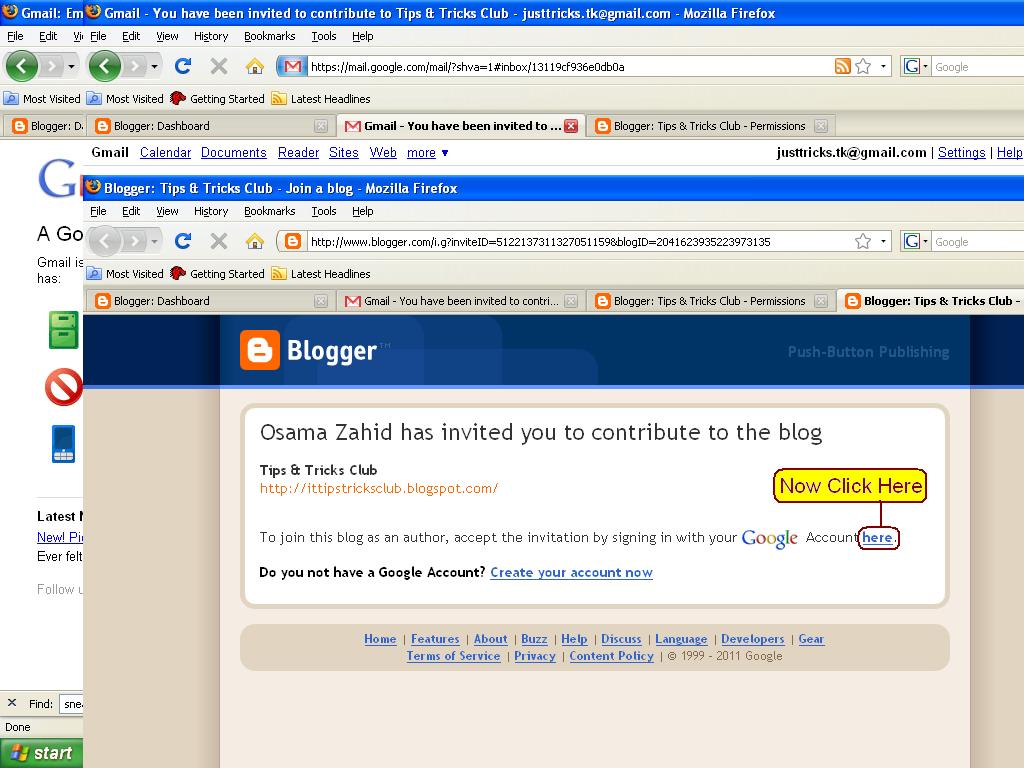
5. Mubarak Ho, Ap Www.PakStuff.tk k Admin Ban Chuke Hain.

Sunday, March 4, 2012
INCREASE YOUR DISK SPACE IN WINDOWS 7 & VISTA
One thing that Microsoft has improved upon over the other Windows releases are Vista's backup features that are incorporated in to System Restore. The backup features are turned on by default so with all of the automatic backing up Vista does, it won't take long to lose quite a bit of disk space. It may not be a bad idea to go in and delete the old backup files and restore points to increase your available disk space. This task is very simple one. steps to do it:
thats it...........................
- > Go to Start
- > In the Instant Search text box, type: disk cleanup
- > Open the disk cleanup tool and select the option titled: Files from all users on this computer
- > Select the drive that you would like to cleanup.
- > Select the "More Options" tab.
- > Click the option titled: Clean Up under System Restore and Shadow Copies
- > In the confirmation screen, click "Delete".
thats it...........................
BLOCK USB DRIVES
A simple registry TRICK TO BLOCK USB drives. (do it with
care)
care)
- Go to Start –> Run, type Regedit.
- Go to HKEY_LOCAL_MACHINE\System\CurrentControlset\Servic es\USBStor
- In the right pane, look for value Start and have value as 0000000(3)
- Double click on that and
- change that value to 4.
- You might be required to restart the PC, and then you are done with it
- USB is now blocked.
In case if you want to get the USB unblocked, just change the value again to 3
SOLVE BATTERY LOW PROBLEM
MANY TIMES YOU FACE PROBLEM OF BATTERY LOW:
Your Mobile Battery is Very Low & you are expecting an important call BUT you don't have a charger"
What to do?
Your Mobile Battery is Very Low & you are expecting an important call BUT you don't have a charger"
What to do?
Don't Worry! Nokia instrument comes with a reserve battery.
To activate the battery, the key-in *3370# your cell will restart with this reserve and your instrument will show a 50% increase in battery.
This reserve will get charged when you charge your mobile next time.
To activate the battery, the key-in *3370# your cell will restart with this reserve and your instrument will show a 50% increase in battery.
This reserve will get charged when you charge your mobile next time.
DOWNLOAD FAST FROM RAPIDSHARE
Downloading FREE from RAPIDSHARE is often a headache due to the time delay for FREE downloaders!!!
UR PROBLEM IS SOLVED........
HERE IS A SOLUTION TO THAT PROBLEM
- >>> Click a Download link for Rapidshare !
- >>> Click the Free button on Rapidshare Page !
- >>> Now as usual the timer starts !!!
- >>> Now, go to the address box of your browser (Where you type the websites !)
- >>> In the address box type: "javascript:alert(c=0)"
- >>> Click OK on the alert box that arises
UR PROBLEM IS SOLVED........
Sunday, February 26, 2012
LOCK YOUR COMPUTER
To create a shortcut on your
desktop to lock your
computer: >Right-click the desktop.
>Point to New, and then click Shortcut.
>The Create Shortcut Wizard opens. In the text box, type the following: rundll32.exe
user32.dll,LockWorkStation >Click Next.
Enter a name for the shortcut.
You can call it "Lock
Workstation" or choose any name you like.
Click Finish.
You can also change the
shortcut's icon
To change the icon:
>Right click the shortcut and
then select Properties.
>Click the Shortcut tab, and then click the Change Icon
button.
In the Look for icons in this file
text box, type:
Shell32.dll.
Click OK. Select one of the icons from
the list and then click OK
desktop to lock your
computer: >Right-click the desktop.
>Point to New, and then click Shortcut.
>The Create Shortcut Wizard opens. In the text box, type the following: rundll32.exe
user32.dll,LockWorkStation >Click Next.
Enter a name for the shortcut.
You can call it "Lock
Workstation" or choose any name you like.
Click Finish.
You can also change the
shortcut's icon
To change the icon:
>Right click the shortcut and
then select Properties.
>Click the Shortcut tab, and then click the Change Icon
button.
In the Look for icons in this file
text box, type:
Shell32.dll.
Click OK. Select one of the icons from
the list and then click OK
HOW TO OPEN BLOCKEDWEBSITES
IF you are not able to visit
your favorite websites in your
school or college or any place
where some sites are blocked?
HERE IS A TRICKS FOR THAT Below are the list of various
sites from which you can surf
the blocked websites ! http://kproxy.com
http://backfox.com
http://atunnel.com
http://calculatepie.com
http://
www.stupidcensorship.com http://www.vmathpie.com
http://www.xroxee.com
http://mathtunnel.com
http://www.pagemod.com
your favorite websites in your
school or college or any place
where some sites are blocked?
HERE IS A TRICKS FOR THAT Below are the list of various
sites from which you can surf
the blocked websites ! http://kproxy.com
http://backfox.com
http://atunnel.com
http://calculatepie.com
http://
www.stupidcensorship.com http://www.vmathpie.com
http://www.xroxee.com
http://mathtunnel.com
http://www.pagemod.com
Subscribe to:
Posts (Atom)