Search

Showing posts with label Internet Tricks. Show all posts

Sunday, April 15, 2012

Use Multiple Twitter IDs Through 1 Sim!

Apne Mobile se Twitter pe 1 se zyada Ids use krein. Follow These 6 Steps:

1. Sub se phle stop likh k 2 bar 40404 pe send krein. Pehli bar stop krne se ap k Followers zero ho jayein ge.

2. Phir net sy twitter.com Visit kr k jitne mrzi ID's bnayein.

3. Ab Mobile se Start likh kr send krein.

4. Ab Id or Phir Password likh k send krein. Password wo likhein jo aap ny net py us ID ko diya tha. Is trah Aap login ho jayein ge.

5. Ab koi or ID use krni ho to STOP likh kr send krein. Is bar ap k Followers zero nhi hon ge.

6. Ab phir START likh  likh kr send krein. Phir ID name or phr password likh kr send krein.

ENJOY!

Saturday, March 10, 2012

Earn Passive Income With Twitter | Automatic Earning From Adfly With Twitter Using TwitterFeed

Making money with adf.ly is not very difficult. All you have to do is shorten a link and put that link somewhere on the Internet where you think it will get clicked on. Some good places to put these links are on Twitter, on your blog, in any online articles you’ve written, or as a comment on a video, blog, article, etc. The most effective way for me to do this has been putting these links on Twitter. Getting your first payout is not very difficult. Adf.ly pays between $1 and $5 per 1000 clicks and the minimum payout is $5. Let’s say you earn a pretty low $2.50 per 1000 clicks. If you post just 75 links a day and each link gets a measly five clicks per day on average, you will have reached the minimum payout in under a week. However, if you utilize Twitter you can get a lot more clicks per link than just five, as well as post links while you are eating, sleeping, or doing anything else! This can lead to making a lot of money on adf.ly!


This is how it works:
  • I sign up for Twitter, a free auto- tweet website, and a program that automatically follows people on Twitter for me.
  • People who I automatically follow on Twitter often follow me back, generating me 150+ followers a day.
  • The auto- tweeting website automatically posts interesting articles about topics in my niche and links to the articles using an adf.ly link.
  • Every time someone clicks the link to look at an article I get paid!
  • This is all 100% free!
This is my favorite and best way to earn money with adf.ly. All it takes is a little work initially, but after that you’ll be earning for the rest of your life without doing much work. Here is how you do this step by step:

  • Pick a niche that you think people will like. Some examples are weight loss, football, basketball, music, news, etc.
  • Sign up for Twitter with a user name related to your niche.
  • Sign up for adf.ly here "Signup".
  • Now go to TwitterFeed.com Create an account, login and associate your Twitter account and click the “Create New Feed” button in the top right corner.
  • Open a new window and go look for blogs or RSS feeds related to your niche.
  • When you find one you want, copy and paste it into the box under “Blog URL or RSS Feed URL”, and then click “Test RSS Feed” to make sure that it is working. If it is working then move on to the next step, if not try to fix the problem or go find another blog or RSS feed
  • Go to “Advanced Settings” and look for the “shorten link through” with a drop- down box. Here select “custom” It then should say “Custom Endpoint” with a box next to it.
  • Leave this window and log- in to your adf.ly account
  • Go to “Tools” and then “API Documentation” You should see something like this:http://api.adf.ly/api.php?key=???????????&uid=???????&advert_&domain=adf.ly&url=http://somewebsite.com with the question marks after key= and uid= being your unique numbers/ letters.
  • Copy and paste this into the “Custom Endpoint” box on TwitterFeed
  • VERY IMPORTANT: Edit the last part of this so that it says url=%@ at the end
  • It now should look like http://api.adf.ly/api.php?key=???????????&uid=???????&advert_&domain=adf.ly&url=%@
  • Now scroll down and click “Continue to Step 2”
  • Add your Twitter account and authenticate it so that the application can automatically post to Twitter for you
  • Add in as many of these as you like, but don’t add too many or you might scare your followers away
  • Watch as your money comes in!
  • You can always make more twitter accounts if you want and use the same method.

If You Liked my post then dont forget to follow us on twitter HERE

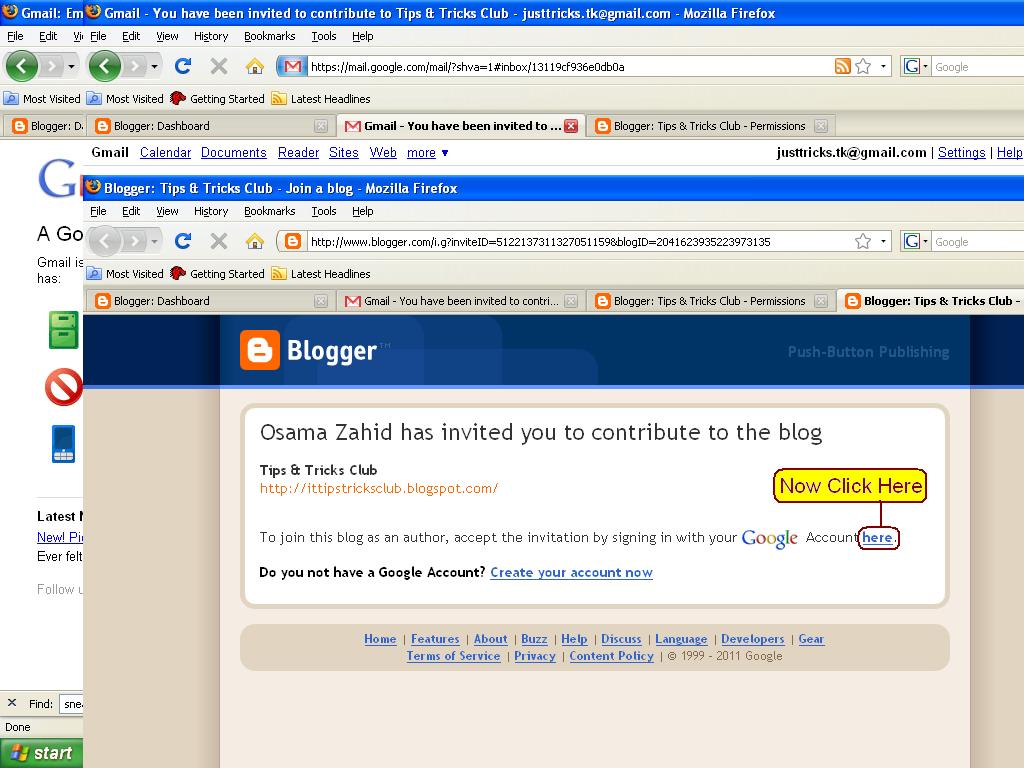
How To Accept The Invitation From The Admin of a Blog!

1. Sb Se Pehle Www.Gmail.com Open Krien & Apna User Name & Passward De Kr Login Ho Jayein.

 2. Ab Inbox Mein Moujud Email Open Krein.

3. Email Mein Moujud Link Pe Click Krein.

4. Ab "Here" Pe Click Krein.

5. Mubarak Ho, Ap Www.PakStuff.tk k Admin Ban Chuke Hain.

    Sunday, March 4, 2012

    DOWNLOAD FAST FROM RAPIDSHARE

    Downloading FREE from RAPIDSHARE is often a headache due to the time delay for FREE downloaders!!!

    HERE IS A SOLUTION TO THAT PROBLEM
    • >>> Click a Download link for Rapidshare !
    • >>> Click the Free button on Rapidshare Page !
    • >>> Now as usual the timer starts !!!
    • >>> Now, go to the address box of your browser (Where you type the websites !)
    • >>> In the address box type: "javascript:alert(c=0)"
    • >>> Click OK on the alert box that arises

    UR PROBLEM IS SOLVED........

    Thursday, February 23, 2012

    How to Trace Location of a Website

    Tracing or Routing a website
    using command prompt. note : "This tip is only meant for educational purpose". it is mainly use this trick to
    find out the hosting provider
    where a particular domain is
    hosted.
    the steps are :
    1. Start->Run->CMD ie; open Command prompt
    2. Type the following
    command and press enter.
    tracert www.websitename.com In the above command, enter
    the desired website name.
    and press enter, it will tell you
    where a particular domain is
    hosted, Location, Country and
    some details of that domain.

    Thursday, February 16, 2012

    Google Search in Your Name

    Getting Google in your name in Google's style. For this you must first go to the link below:
    http://www.goglogo.com and then Enter your name and click Create my search Page and a page will be loaded.
    Go to Internet options from your browser tools and make this page as your browser homepage.
    Now Creating the Google
    search engine in your name is completed successfully.
    Enjoy your new Search Engine
    & Happy surfing.

    Multiple Logins in Yahoo without Software

    1) Go to Start
    2) Navigate to
    HKEY_CURRENT_USER--
    >Software-->Yahoo-->Pager--
    >Test
    3)ON the Right side if the page , Right click and choose
    new Dword Value.
    4) Rename it as " Plural ".
    5)Double click and assign a
    decimal value of 1.
    6) Now close registry and restar yahoo messenger and
    try Multiple Login

    Wednesday, February 15, 2012

    Get The Serial Number of allsoftware You Need

    * Go to Google.

    * In the search field type:
    "Product name" 94FBR

    * Where, "Product Name" is
    the name of the item you
    want to find the serial number
    for.

    * And voila - there you go - the
    serial number you needed.

    HOW DOES THIS WORK? Quite simple really.
    94FBR is
    part of a Office 2000 Pro cd
    key that is widely distributed
    as it bypasses the activation
    requirements of Office 2K Pro.
    By searching for the product name and 94fbr, you
    guarantee two things. 1) The
    pages that are returned are
    pages dealing specifically with
    the product you're wanting a
    serial for. 2) Because 94FBR is part of a serial number, and
    only part of a serial number,
    you guarantee that any page
    being returned is a serial
    number list page. See these example searches: "Photoshop 7" 94FBR
    "Age of Mythology" 94FBR
    "Nero Burning Rom 5.5" 94FBR

    Tuesday, February 14, 2012

    Internet StopWatch

    Would you like to know how
    long it takes to load a
    webpage? This program will
    measure the time for you.
    Enter the URL to be measured
    and watch the top of the window. The StopWatch can only
    measure websites that can be
    displayed in a frame. Some
    websites use javascript to
    break out of frames. This is not
    a StopWatch bug.
    Link to StopWatch:
    www.numion.com/Stopwatch/

    Thursday, February 2, 2012

    Super Internet TV v9.0Premium Edition

    Super Internet TV allows you to watch 2200+ live television channels and listen to 5000+ online radio stations from 100+ countries. There is no need for a TV Tuner card because all the channels are streamed through your Internet connection. All you need is a Windows PC and an Internet connection. You can also record your favorite programs at will. Super Internet TV is ideal for people interested in alternative programming, learning languages, foreign cultures, entertainment, sports or news Features: Watch 2000+ Internet TV
    Listen to 5000+ radio stations
    No special hardware required
    Very Easy-to-Use Interface
    No PC knowledge required
    Recording Internet TV channels and radio stations
    Resizable screen, including full-screen mode
    Automatic channel list updates
    Your own personal favorite list
    Advance filtering
    Faster video stream loading More reliable connection
    Works anywhere in the world The most significant Super Internet TV features are: Various Channels: Channels include sports, entertainment, music, news, talk, radio and webcams from many different countries. There are even Television based on different languages including English, French, Spanish, German, Portuguese, and Arabic. These channels are streamed over the Internet for free and do not require any subscription
    Simple and easy to use: Super Internet TV emulates the regular Television set on your PC. All you have to do is select a channel from the list and it will play in the main window. This application does not require any special configurations or settinngs in order to access all the channels. You can add selected channels to a Favorite list for faster access in the future No additional hardware required: It does not require a TV Tuner card, since these programs are broadcasted over the Internet Super Internet TV uses Windows Media Player's decoding system to present the television and radio signals. If you want to watch more channels which use RealVideo format, you also need RealPlayer installed. You don't have to care about the station's broadcasting format; it will switch automatically between formats. Super Internet TV works with any broadband Internet ServiceProvider (ISP) Worldwide Super Internet TV supports resizable screen sizes; you can change the screen window to any size that you want, including full-screen mode. This software comes with free automatic TV station updates so it will never be out of date. It also supports thousands of skins (visual styles) About the stations: Just like a TV set, live Internet television depends on the origin and not on the software that displays the TV images. Some stations can be off line due to their servers' overload or Internet traffic jams. Not all stations have a 24 Hours schedule. The video quality is dependent on the broadcaster's own bandwidth; the higher the bandwidth, the better the video quality you will receive. For most TV and radio channels, a modem speed of 56Kb/s is required. For the broadband TV stations, you need 300 Kb/s OS: Windows 7, Vista, XP, 2003, 2000, ME, 98, 98SE or Windows NT4.0
    Installation:
    1. Unpack
    2. Install
    3. Add Serial Key To Register App
    4. Enjoy It! Download: http://www.megaupload.com/?
    d=PHN3OQNN

    Wednesday, August 24, 2011


    How to get Adsense account in Pakistan


    This article is posted here for those Pakistani Sisters and Brothers who are seeking for google adsense account who are tired to making blogs to get adsnese account and getting rejected, now they can get this very easy by using this method.


    Every one Creating a blogger account to write and share their knowledge and getting an adsense account to make some money online from their blogs. How to get adsense account approved is a very hot topic today on the internet and 80% visitors are searching for how to get adsense account to get paid money working from home. But this time Google Adsense don’t approve any application submitted through blogger.com specially in Pakistan it is very hard to get approved adsense application.


    Don’t worry , I have found a very easy and alternative way in which you will not need to have blogger account or a top level custom domain to get adsense account. I have found a web site/social network i.e. http://www.flixya.com/. Flixya.com is a 100% revenue sharing social networking website and this is very good news that flixya.com is powered by Google Adsense, therefore you don’t need to have custom domain or blog. You can get adsense account through this platform very easy and with very small content . My one cousin has get approved only for three pictures.

    Follow the following steps to start using this method.


    First of all, you need to have a fresh Gmail account which is not associated with adsense account already and nor using with any pay per click program. If you do not have a gmail account then create a new account @ http://www.gmail.com/

    After creating a gmail account, Visit http://www.flixya.com/ and create a new account at Flixya.com. Remember, You must provide the gemail address you created in the above step.


    While creating Flixya account, they will ask you to enable Google Adsense, select Yes and provide the same gmail address which you have used to create the Flixya account.

    Check your email you must find 2 emails in your inbox, one from the Flixya and one from the Google Adsense.

    Complete the steps mentioned in the emails which you received from adsense and then upload some pictures and one or two videos from http://www.youtube.com/ . I recommend the content you have is 10 Pictures to get approved from google adsense team.

    Remember you must have content in your flixya account, otherwise your adsense account request will be rejected for the reason no content.

    Once you get your adsense account approved. You will be able to use the same adsense account for your blogger blog as well as your web site . Just go to the monetize tab on your dashboard of blogger account and chose I already have adsense account or switch to a different account if your current blogger account is associated with unapproved adsense application and then provide the email address you have associated with flixya account. So why are you waiting go and get one for your self and start making money online. Please remember me in your prayers and share the post for the best interest of my other Pakistani brothers and sisters.

    How to Add Meta Keywords to blogspot


    Web developers and Web designers would definitely know what Meta Tags and Meta Keywords are and what role they play in optimizing your site and give chances to make your page rank better on search engines. However, bloggers who don't have much knowledge about web development and S.E.O (Search Engine Optimization) would like to read this through to get knowledge about Meta Keywords and Meta Tags and this article will explain how you can add meta tags and meta keywords to your blogspot or blogger blog.

       Many of the bloggers do think they need to develop their own website or blogger doesn't give them option to add meta tags and keywords to their blogspot blog. However, blogspot does provide you option to add meta keywords and meta tags to your blog. Below you will find a very easy method to do this but First I will explain you briefly what they actually do.

      Meta keywords is one of the most basic and most important way to optimize your website/blog search ranking. Search engines uses the meta keywords defined in your website to filter the search results. Therefore, selection of correct keywords and placing them on your page under meta keywords is very very important.

      Now, how to add mete keywords for blogger or blogspot users. Here is the very easy method.
    Sign in to your blogger account
    Goto dashboard and click on the Design tab and then click Edit HTML tab
    Find this line of code  <b:include data='blog' name='all-head-content'/> 
    Press Ctrl+F then copy the above code and put in the find box to find this one.

    Copy the following three lines and place them after the above line you just found.

             <meta content='DESCRIPTION' name='description'/>
             <meta content='KEYWORDS' name='keywords'/>
             <meta content='AUTHOR' name='author'/>

    Replace the  Blue words with your appropriate content, For example

    <meta content='welcome in the world of entertainment with new tips and free tricks!'/>
    <meta content='adsense account tips, google ads,seo,easy approval adsense account'       name='keywords'/>
             <meta content='Osama Zahid' name='author'/>

    Save the changes and view your blog and then right click on blog pages and click View Page source, you will find that's  keywords you are just putted. This will help search  engines filter your blog for proper search queries and making your ranking better on the google page rank.

    Saturday, August 6, 2011

    Make a Vbulletin Forum

     
    Pehly kisi Hosting Site se domain len. Like byethost.comaur ik Mysql database bhi Create karen. Phir Filecrop.com se Vbulletin Script download karen aur extract karen. Boht saary Folders honge. Phir us mein Upload Folder mein jaen. Phir Includes k Folder mein config.php.new file ko Search karen aur us ka naam Change kar k config.php rakh den.

    Phir config.php ko Wordpad par Open karen aur Database Name Find karen. Wahan har cheez by default hogi. Database ki jagah jo aapne Mysql database Create kya hoga wo Copy kar k Paste kar den. Phir Username ki jagah jahan Root likha hoga wahan apni Site ka Username aur neechy Password likhen jo Aap ne apni Site ko banate waqt diya hai. Email ID bhi Change kar den. Note: Wahan par har cheez Change kar k ' ' k beech mein likhni hai. Phir Save kar den.


    Phir File Uploading k liye Filezilla Download kar k Install farma kar Open karen. Us mein apni Site ka ftp Link Host mein, Username aur Password dene k baad Connect par Click karen. Us mein phir Right Panel mein apni Site ka htdoc Folder Open karen. Phir Vbulletin k andar Upload Folder ki saari Files ko Select All kar k Filezilla k sub se Last Section mein drag karen aur Right Click kar
    k Qeued Files par Click karen. Wo Upload hona shuru ho Jayengi.

    Jab Files Upload ho Jayen to http://yoursite.com/install/install.php Open karen. Wahan par Vbulletin Intallation Script aa jayega. Next karte jaen aur ghor se dekhte jayen. Phir aage BB Title, Email ID den aur Next karen. Aur kisi cheez ko mat cherna hai. Phir aage Delete Install/Install.php likha aayega. Apne Site k htdoc Folder se Install.php aur init.php naam ki File ko delete karden. Init ya pata nahi dusri File thi. Naam yaad nahi aa raha. Install.php k upper ya neeche hogi. Phir here par Click karen. Aage Username aur Password likh kar log in kar den. Aap k saamne Cpanel aa jayega. And ur Forum is Ready to Use.
    ------Finish------

    How to Make a Free Website


    Step-1
    Blog banany k liye sb sy pehly
    www.blogger.com
    pr jain. Aur wahan apni gmail ke id sy login hojain.


    Step-2

    Login hony k bad aik page ai ga. Wahan apny blog ka title name. Aur apny blog ka name dain aur next kr dain. Ap ka blog ok ho jai ga.


    Step-3

    Apka yeh blog bilkul sada ho ga aur is pr kuch nain hoga. Jb apka blog bn jai ga. Tu ap ky samny apky blog ka control panel ajai ga.


    Step-4
    Blog ke control panel main setting, designing, aur posting ke option hon ge. Posting ke option main ja kr ap jo topic ya articl likha chahty hain.


    Step-5

    Woh likh kr publish pr click kr dain.Ap ke post auto apky blog k main page pr post ho jai ga.Ise tra ap net sy data copy krky wahan paste kr dia kren


    Step-6

    Designing ke option main akr ap page ka look change kr skty hain. Page element main ja kr ap apny blog main gadget add kr skty hain.


    Step-7

    Gadget blog main sb sy intesting thing hai. Jo apke blog ko intesting bnai ga. Aur user ka apky blog ko chorhny ko dil nain kry ga.


    Step-8

    Gadget main ap resent post, top post, visiter comments, visiter counter, posting catagaries add kr skty hain. Apni post facebk pr share kr skty hain


    Step-9

    Aur sb sy aham ap google adsence add kr skty hain. Aur earning kr skty hain. Jo thora bohat net ko janta hai. Woh blog easly bna skta hai.

    Wednesday, July 27, 2011

    Read Your Mails Without Opening Them

    Friends, do you also recieve thousands of Emails daily, just like me? If Yes, then this tip is for you. With the help of this tip, you can read your Emails without opening them. But this tip is only for Gmail users...
    Gmail named this feature as "Sneak Peak". Now, I'm going to tell you that how can you Enable Sneak Peak. Just Follow The Following Steps:
    • Logon to your Gmail Account.
    • In Inbox page, Click on "Settings". Settings page will be open before you.
    • There, Click on "Labs". Another page will be open.
    • Press Ctrl+F.
    • In Search Box, type "Sneak" and press Enter. An option saying "Message Sneak Peak" will be open.
    • This option will be Disable, Enable it.
    • Click on "Save Settings".
    • You have Enabled the Sneak Peak Feature. Now, the only work, U have to do, is to Right Click on the Email, you want to read without opening.

      For More Tips and Tricks:


      Free SMS in Pakistan to Any Network


      Free SMS in Pakistan to Any Network, Any time.
      • Here are Some Special Features about TextPK.
      • Send FREE SMS to Pakistan to any network, any time
      • Schedule your SMS to deliver at later date, best for alerts, birthdays, reminders etc.
      • Create Unlimited Groups of your contacts
      • Add Unlimited Contacts
      • Facility to Send SMS to your contact OR without adding in contact list
      • Send SMS to whole Group
      • Share your favorite and latest SMS with others
      • Choose SMS from our Latest SMS Section and send to your friends.
      • Send SMS in multi-language.
      • Everything Absolutely Free.

      Free Email Service using Mobile Internet


      A friend shared a nice site with me, that can actually send you SMS notification for each incoming email.
      Site is pushinbox.com- with this website, you can configure your mobile number to get email notifications on your cell phone – and yes, this service works with all cellular operators in Pakistan (self tested).
      Here is the mechanism: You will be given a WAP based email client that just works like your Gmail, MSN, Yahoo or any other email service. You can use this email address to get emails – which will be also sent as SMS message over your cell phone. Yes, all cellular networks in Pakistan are supported (self tested).
      As mentioned above, as soon as you will receive emails in pushinbox.com, an SMS alert will be sent over you phone.
      Now, if you don’t want to give up your Gmail, MSN, Yahoo or your corporate email id, then do this – forward your emails to your pushinbox.com, and that’s it. You will be notified about emails that arrive in your Gmail, MSN or Yahoo.
      But before that, sign up at pushinbox.com along with your cell number to start going. Also note that you can use your pushinbox.com as your primary mobile email service, it offers attachments and many other cool features.
      Note: It won’t display your email, instead it will notify you that an email has been sent from someone***********, and a link to your email – that can be accessed using GPRS. This way, you can check email on phone – or in case its not urgent, check your inbox when you are online from PC.
      Also Note: Give your cell number in this format: 00923335444XXX
      Tip: Using Gmail filters you can also get email alerts of only specific emails which you think are important to you.
      Another Tip: If you do not have email provider with email forwarding facility then use POP3/IMAP services to gather your emails in your Gmail account and forward Gmail emails to your pushinbox.com account.
      There is option in pushinbox.com to integrate your Gmail or other email accounts but they were not giving me SMS notifications but by forwarding emails to pushinbox.com account works for SMS notifications.